Files: your space and the household's
Updated 18 October 2026
Files is a place to keep the papers of everyday life: letters, manuals, statements, homework. PelQi can search inside them and answer questions about them when you ask. My files is only yours; Home is shared by the grown-ups at home on Family or Max.
Every plan. Space depends on the plan, Home is for Family and Max, and asking PelQi about a file comes with Plus, Family and Max.
Add files
- Open Files in the sidebar (on a phone, More, then Files).
- Choose My files or Home at the top.
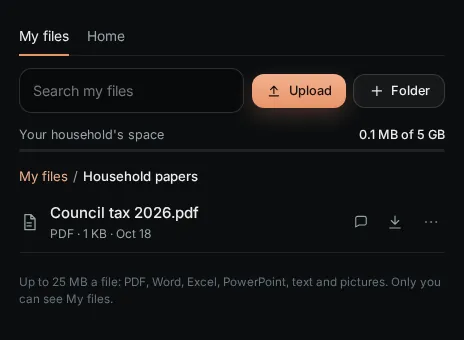
- Choose Upload and pick one or more files. Each can be up to 25 MB: PDF, Word, Excel, PowerPoint, text and pictures.
- Choose Folder to make a folder (up to five deep). Use the dots on a file to Rename, Move to a folder, move it between My files and Home, or Delete.
Find and open
- Type in Search my files (or Search Home). Search covers file names and the words inside Word, Excel, PowerPoint and text files.
- Tap a file to open it in the side canvas: pictures, the words of a document, spreadsheets as tables. PDFs download.
- From your chats and Made by PelQi list files you sent in chat and documents or charts PelQi made. They go when their chat is deleted; choose Keep a copy in My files to keep one.
Ask PelQi about a file
Choose Ask PelQi about it on a file. It goes with your next message, so you can ask "when does this warranty end?" PelQi can also look in your files by itself when you ask ("find the boiler manual"). Asking about files comes with Plus, Family and Max.
Space by plan
- Free: 100 MB. Plus: 2 GB. Family: 5 GB shared by everyone at home. Max: 20 GB.
- Home holds up to 5 GB. On Family that 5 GB is shared by Home and everyone's own files together. Files you upload, files sent in chat and documents PelQi made all count.
- Children have their own My files, which only they can see. They never see Home, and grown-ups never see a child's own files.
What it can and cannot do
- It keeps PDF, Word, Excel, PowerPoint, text and pictures, up to 25 MB each, in folders up to five deep.
- What a file is comes from its contents, not its name: macro-enabled Office files, locked PDFs and other kinds are refused.
- Nothing in a file is run or opened by another program. PelQi reads the words of Word, Excel, PowerPoint and text files so search can find them.
- PelQi never looks in someone else's My files, and never in Home for a child.
- Deleting a file, a chat or your account deletes the stored copy too.
If it does not work
- A file is refused: see A file will not upload.
- "Files is not switched on yet." Files is briefly unavailable. Try again later; files you sent in chat still work.
- No Home tab: Home is for households on Family or Max.
Still stuck?
Email info@fortisdatagroup.com with what happened, what you expected and the device you use (for example, iPhone app, or Chrome on Windows). A person reads every message and answers within two working days. Never send a password or a code.
Common questions are also on the support page.