Share the family calendar to Google, Apple or Outlook
Updated 18 October 2026
PelQi gives your household a private calendar link. Add it to Google Calendar, Apple Calendar or Outlook and the family calendar shows there too, and keeps itself up to date. It works on every plan.
Every plan.
Add it to your calendar app
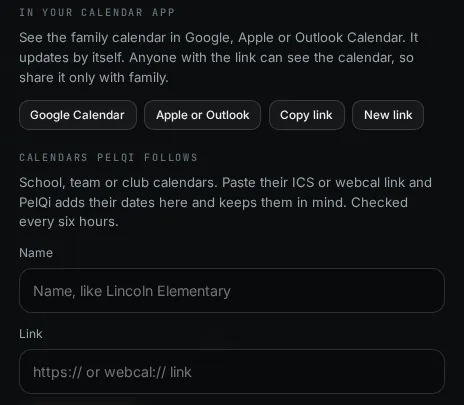
- Open Connections from your account menu (or Settings, Calendar) and find In your calendar app.
- Choose the button for your app. Google Calendar opens Google with the link ready to add. Apple or Outlook opens the link in the calendar app on that device. Copy link copies it for any other app that can subscribe to a calendar by address.
- Confirm the subscription in your calendar app.
What it can and cannot do
- It publishes your household's own events, from 60 days back to more than a year ahead, to any app that can subscribe to a calendar link.
- It is one-way: changes made in your calendar app do not come back into PelQi.
- Calendars PelQi follows are never passed on through it.
- New link replaces the old one at once.
What you should see
The family calendar appears as its own calendar in your app. It carries your household's own events from 60 days back to more than a year ahead. Your calendar app decides how often it checks for changes, so a new event can take a while to show (Google can take several hours).
Keep the link private
Anyone with the link can see the family calendar, so share it only with family. If it has gone somewhere it should not, choose New link: the old link stops working at once, and calendars using it stop updating until you add the new one.
If it does not work
- Nothing new shows in Google Calendar: Google refreshes subscribed calendars on its own schedule. Give it a few hours.
- The calendar disappeared or stopped updating: someone may have made a new link. Add the current one again.
- Calendars PelQi follows (school, club) are not passed on through this link, only your own events.
Still stuck?
Email info@fortisdatagroup.com with what happened, what you expected and the device you use (for example, iPhone app, or Chrome on Windows). A person reads every message and answers within two working days. Never send a password or a code.
Common questions are also on the support page.