Timers and alarms
Updated 18 October 2026
Say "set a 12 minute pasta timer" or "wake me up at 6:30 on weekdays" and PelQi does it at once. You can run several timers and alarms with names, and they never use your allowance, even when the day's chat is used up.
Timers and alarms work on every plan, for children too, and never use your allowance.
Set a timer or alarm
- Say or type it: "pasta, 9 minutes", "set a 20 minute timer for the oven", "alarm at 7am tomorrow", "wake me at 6:30 on weekdays".
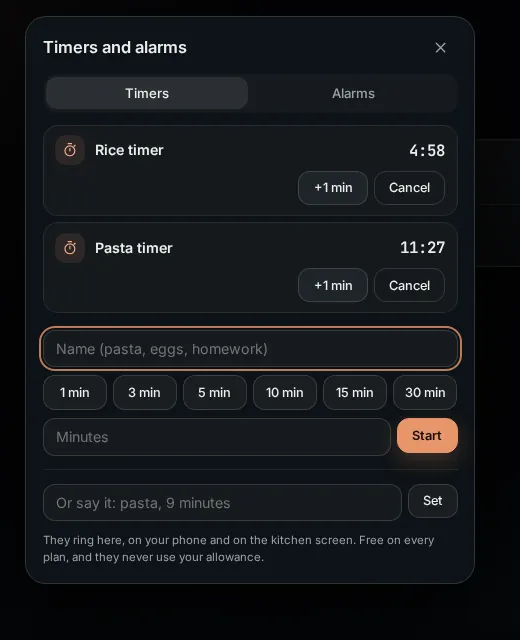
- Or open Timers and alarms (from the Timer button on Today, or Search). On Timers, give it a name, tap a quick length (1 to 30 minutes) or type the minutes, and choose Start. On Alarms, choose the time, the days it repeats, and Set alarm.
- Change them by asking: "add 2 minutes to the pasta timer", "cancel the rice timer", "what timers do I have".
- "Cancel all timers" cancels your own. Someone else's timer at home (a child's homework timer, say) is cancelled only when you name it: "cancel the homework timer".
When it rings
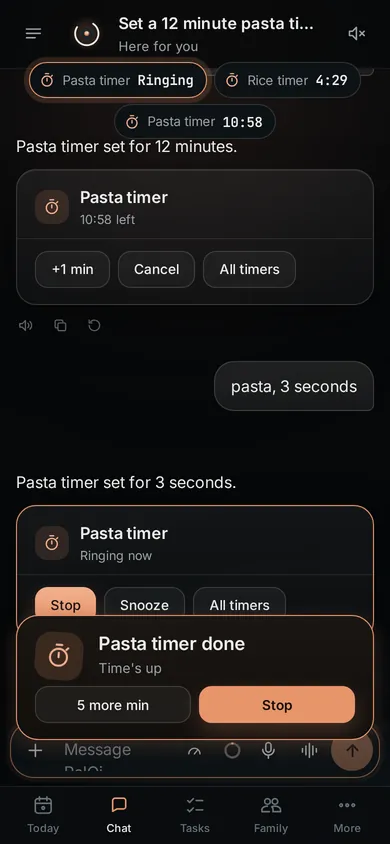
- A timer rings on every PelQi screen you have open and on every kitchen screen at home. An alarm rings only on your own screens. Your phone gets a notification with sound.
- Tap Stop, or Snooze (5 minutes for a timer, 9 for an alarm), on whichever screen is nearest, or on the notification, or say "stop". The others go quiet within a second.
- A ring nobody answers stops by itself after 10 minutes.
What it can and cannot do
- Timers never use the model or your allowance, so they work even when the allowance is used up.
- Up to 10 timers running and 20 alarms per person.
- A timer rings on all your open screens and every kitchen screen at home; an alarm only on your own screens.
- A ring nobody answers stops after 10 minutes.
- On the iPhone app, alarms do not yet break through Focus; keep a PelQi screen open for the surest ring.
What you should see
Running timers show in a strip at the top of the chat with their time left. Alarms follow your own time zone, so 7:00 stays 7:00 when the clocks change. Up to 10 timers and 20 alarms at once.
If it does not work
- Silent on iPhone: see Timers are silent on iPhone.
- Late when PelQi was closed: an open PelQi screen rings on time; a notification to a closed browser can arrive late. Keep PelQi open, or use a kitchen screen, for anything that matters.
- PelQi was offline at alarm time: you get one quiet notice instead of a late ring, and a repeating alarm moves to its next day.
Still stuck?
Email info@fortisdatagroup.com with what happened, what you expected and the device you use (for example, iPhone app, or Chrome on Windows). A person reads every message and answers within two working days. Never send a password or a code.
Common questions are also on the support page.