Link Home Assistant
Updated 18 October 2026
PelQi works your smart home through your own Home Assistant. A grown-up links it once for the whole household by pasting its address and a long-lived access token. After that, everyone at home can ask PelQi to turn lights on, set the thermostat or run a scene, by chat, voice, the kitchen screen, the phone line and routines.
Smart home comes with PelQi Plus, Family and Max. A grown-up links it once for the household.
What you need
- A Home Assistant that works from anywhere on the internet over https. Home Assistant Cloud (an address ending in ui.nabu.casa) works, and so does your own https address on port 443, 8123 or 8443.
- A Home Assistant that only works on your home network cannot be used. PelQi runs on the internet, and it refuses home network addresses on purpose.
- An administrator account in Home Assistant is best: with it, PelQi can see what each script touches. See What PelQi can and cannot do.
Make a long-lived access token
- In Home Assistant, open your profile (your name at the bottom of the sidebar).
- Open the Security tab.
- Under Long-lived access tokens, choose Create token, name it "PelQi" and copy it. Home Assistant shows it only once.
Link it in PelQi
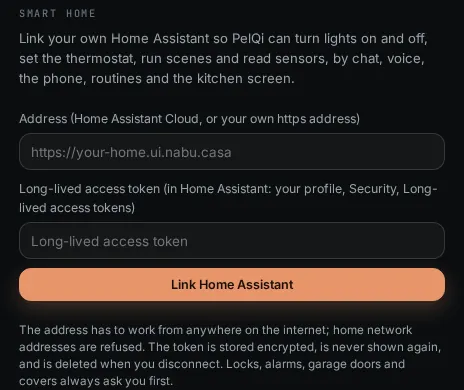
- In PelQi, open Connections from your account menu and scroll to Smart home.
- Paste your address into Address, for example https://your-home.ui.nabu.casa.
- Paste the token into Long-lived access token.
- Choose Link Home Assistant. PelQi checks the address and token with your Home Assistant before saving.
What it can and cannot do
- One Home Assistant per household. Every grown-up at home uses it on their own plan; children only use devices a grown-up chose for them.
- It works lights, switches, fans, speakers, thermostats, scenes and scripts straight away, and asks first for locks, alarms, garage doors and covers.
- It only connects to public https addresses, and never to a name or address on your home network.
- The token is sent only to your Home Assistant, is never shown again and is never written to logs.
- If the grown-up who linked it moves to Free, smart home pauses for everyone until a grown-up on Plus, Family or Max links it again.
What you should see
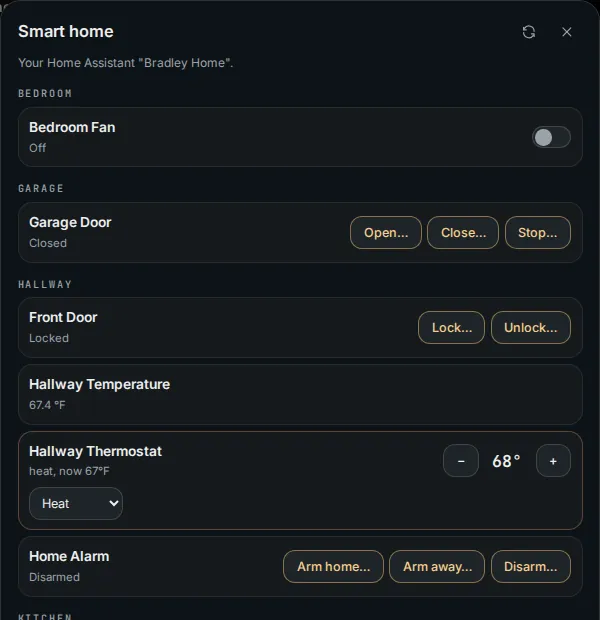
The section shows your Home Assistant's name and version and who linked it, with Open smart home and Disconnect. Open smart home lists your rooms with switches, brightness sliders, the thermostat and your scenes. The token is stored encrypted, is never shown again, and is deleted when you disconnect.
If it does not work
- "PelQi can't use that address" or "That address is not on the public internet": see Home Assistant connection refused.
- "Home Assistant didn't accept that token." Make a new long-lived access token and paste it again, with nothing before or after it.
- "Smart home is part of PelQi Plus and Family." Smart home needs Plus, Family or Max.
- "Smart home is paused: the plan it was linked on no longer includes it." The grown-up who linked it moved to Free. A grown-up on Plus, Family or Max can link it again.
Still stuck?
Email info@fortisdatagroup.com with what happened, what you expected and the device you use (for example, iPhone app, or Chrome on Windows). A person reads every message and answers within two working days. Never send a password or a code.
Common questions are also on the support page.