Smart home for children
Updated 18 October 2026
Children have no smart home at all until a grown-up chooses devices for them. A child can then switch only those devices, by chat, the Smart home sheet or plain words. Anything else is refused.
Smart home comes with PelQi Plus, Family and Max.
Choose devices for a child
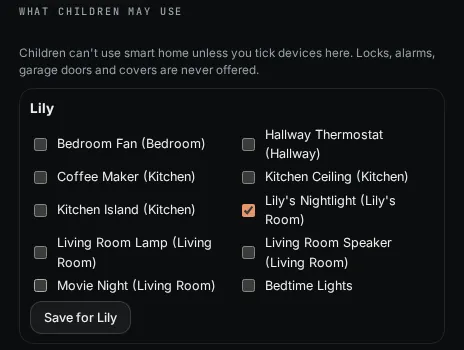
- As a grown-up, open Connections and scroll to Smart home.
- Under What children may use, find the child's name.
- Tick the devices they may use, for example their own nightlight.
- Choose Save for and the child's name.
What it can and cannot do
- A child sees and changes only the devices ticked for them, by chat, the Smart home sheet or plain words.
- Locks, alarms, garage doors, covers, scenes and scripts that touch them, and sensors are never in the list.
- Shared routines a child runs are held to that child's own devices.
- Only grown-ups can link Home Assistant.
What you should see
PelQi says, for example, "Lily can now use Lily's Nightlight." On Lily's PelQi, the Smart home sheet shows only that device.
If it does not work
- A child who sees "No devices yet. Ask a grown-up to let you use some." has no devices ticked.
- "Ask a grown-up: that isn't one of the things you're allowed to change." means the child asked for a device that is not ticked.
Still stuck?
Email info@fortisdatagroup.com with what happened, what you expected and the device you use (for example, iPhone app, or Chrome on Windows). A person reads every message and answers within two working days. Never send a password or a code.
Common questions are also on the support page.