The Today board and Brief me
Updated 18 October 2026
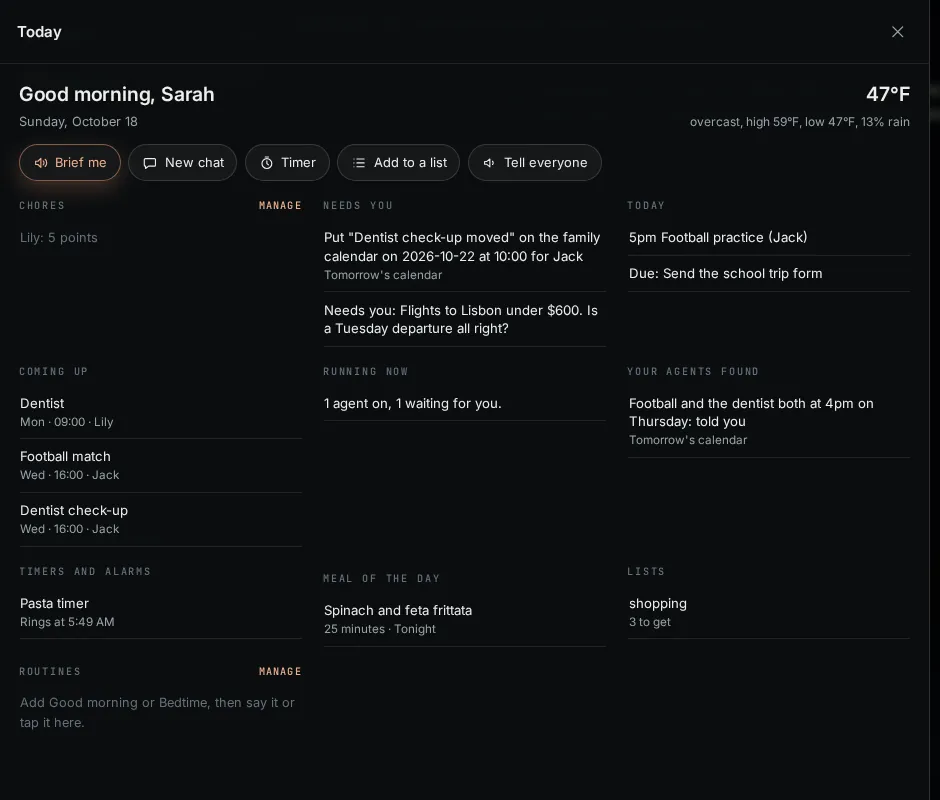
Today is one board for your day, built from everything PelQi holds: the weather in your town, the family calendar, what needs your answer, what is coming up, timers, tonight's meal, chores and lists. Every line opens the thing it is about.
Today works on every plan.
Open Today
- Choose Today at the top of the sidebar, or the Today tab on a phone.
- Read down the board. Parts with nothing in them are left out.
- Tap any line to open it: a calendar item opens the calendar, an approval opens Approvals, a timer opens Timers and alarms, a list opens Lists.
Quick actions
- Brief me reads your day aloud in your PelQi voice: the day, what waits for your OK, what your agents found and tonight's meal.
- New chat, Timer and Add to a list do what they say. Tell everyone makes an announcement (Plus, Family and Max).
Choose where PelQi opens
- At the foot of the board, choose Open on Today instead or Open on chat instead. The same choice is in Settings, You, When PelQi opens.
- On PelQi Max, PelQi opens on Today by default, with your agents beside the day. Other plans open on chat unless you choose Today.
What it can and cannot do
- Today uses no allowance; it reads what PelQi already holds.
- It says the same as your morning brief, and every line opens where it lives.
- Done since yesterday lists what PelQi finished, including the latest report from each of your scheduled tasks ("Ran: School bag check. Pack the PE kit."). Tap a line to open that task.
- Children get their own simple board with nothing of the grown-ups' (no approvals, tasks or agents).
- On Max, your agents show beside the day.
What you should see
The weather needs your town: set it in Settings, You, Your town, for the weather. Children get their own simple board with their chores, stars, timers, the meal of the day and lists.
If it does not work
- No weather: add your town in Settings, You.
- The morning brief does not arrive: check Settings, You, Notifications, Morning brief and see Notifications are not arriving. Tick Email it to me too to get it by email as well.
Still stuck?
Email info@fortisdatagroup.com with what happened, what you expected and the device you use (for example, iPhone app, or Chrome on Windows). A person reads every message and answers within two working days. Never send a password or a code.
Common questions are also on the support page.