"/" commands and "@" mentions
Updated 18 October 2026
Typing / at the start of the message box opens a list of shortcuts. Typing @ anywhere lets you point PelQi at a person at home, a list or a calendar. Both work by keyboard or tap.
Commands and mentions work on every plan. Some commands follow their feature's plan.
Use a "/" command
- Type / at the start of the message box. The list opens and filters as you type.
- Pick one with the arrows and Enter (or Tab), or tap it. Escape closes the list.
- Add your words after it, for example "/list milk and eggs", and send.
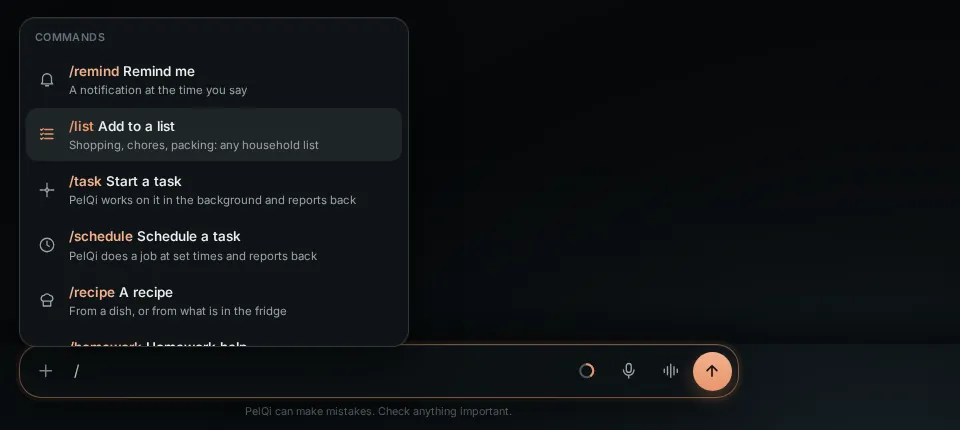
The commands
- /remind a reminder at the time you say. /list add to a list. /recipe a recipe card. /homework coached help, never just the answer.
- /task a background task. /schedule a scheduled task.
- /call PelQi phones a business for you, after your tap (Plus, Family and Max). /browse PelQi uses its browser.
- /timer and /alarm set timers and alarms; /announce makes an announcement (Plus, Family and Max).
- /usage shows today's allowance, /new starts a new chat, /work switches to PelQi Work if you are in a workspace.
- /text is shown switched off: texting from PelQi's number is not available yet.
Use an "@" mention
- Type @ and choose from the list: people at home ("Child, 9", "You"), your lists with how many things are left, the family calendar and calendars it follows. People in a PelQi Work workspace also see Work and its connected services.
- Send your message as usual, for example "what's on @shopping?" or "tell @Lily football moved to 5".
What it can and cannot do
- Commands and mentions are checked on the server. A command your plan or a child may not use is refused before PelQi answers and uses nothing.
- "@" mentions only find people, lists and calendars in your own household (and your PelQi Work workspaces).
- Children see only the commands they may use.
- /text stays off until PelQi's number is registered for texting.
What you should see
A quiet line above the message box names the command and gives a hint, or says why it is off. The command and mentions are picked out in the chat.
If it does not work
- A command is greyed out with "See plans": it is part of another plan. Your words are kept in the box and nothing is used.
- Children see /remind, /list, /recipe, /homework, /timer, /alarm, /announce (to the grown-ups), /usage and /new.
Still stuck?
Email info@fortisdatagroup.com with what happened, what you expected and the device you use (for example, iPhone app, or Chrome on Windows). A person reads every message and answers within two working days. Never send a password or a code.
Common questions are also on the support page.