Announcements to everyone at home
Updated 18 October 2026
An announcement is said out loud on everyone's PelQi at home, with a soft chime, and shown in big type on the kitchen screen. People reply in one tap, and you see who heard it.
Announcements come with Plus, Family and Max.
Make an announcement
- Say or type "tell everyone dinner is ready", "tell the kids to come down", or "announce to Oliver: leave in 5 minutes".
- Or choose Tell everyone on Today, or Announce to everyone in Search. Write it, pick Everyone at home, The grown-ups or The children, and send.
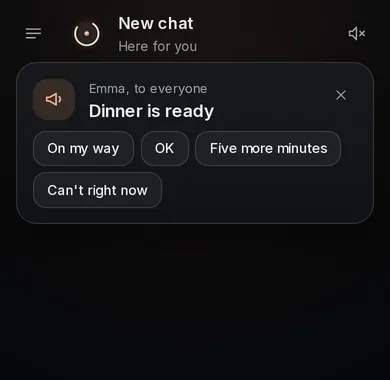
Replies
- The people it is for see it with four quick replies: On my way, OK, Five more minutes and Can't right now.
- Your card in chat shows each person as Sending, Heard it, Sent to their phone, or their reply. Replies also pop up on your screen and phone.
- Anyone whose screen is not open gets a notification after a few seconds.
Quiet hours
- In Family, Quiet hours, a grown-up sets their own and the children's. Children start with 8pm to 7am.
- Inside quiet hours an announcement still arrives, but silently: no voice, no chime, no notification ping.
What it can and cannot do
- Announcements reach everyone's open PelQi screens at once and are read aloud; others get a notification.
- Children can announce only to the grown-ups at home.
- Inside quiet hours an announcement arrives silently.
- Never sent as a text message, an email or to Teams.
- Up to 200 characters, 20 an hour per person.
What you should see
Children can announce only to the grown-ups at home. Announcements are never sent as texts or emails. Up to 200 characters, and 20 an hour each.
If it does not work
- "Announcements to everyone at home are part of PelQi Plus and Family": your household is on Free. See Upgrade your plan.
- "Tell Tom football moved to 5" is a note for later, not an announcement: PelQi passes it on next time Tom opens PelQi.
- Nobody heard it: check their quiet hours, and that their notifications are on.
Still stuck?
Email info@fortisdatagroup.com with what happened, what you expected and the device you use (for example, iPhone app, or Chrome on Windows). A person reads every message and answers within two working days. Never send a password or a code.
Common questions are also on the support page.