Reply modes: Quick, Thorough and Research
Updated 18 October 2026
Beside the message box is the reply mode. Quick is the everyday default. Thorough takes a little more care and uses a little more of today's allowance. Research works through the web step by step and comes back with an answer and its sources.
Thorough and Research come with Plus, Family and Max.
Choose a mode
- Tap the reply mode beside the message box (on a phone it is a small gauge mark).
- Choose Quick, Thorough or Research. Your choice is kept on this device.
- Send your message as usual.
Run a Research
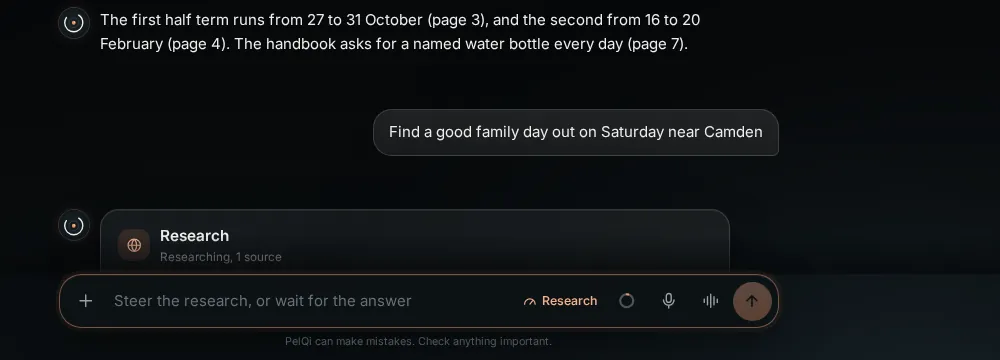
- Choose Research and ask your question, for example "Find a good family day out on Saturday near Camden".
- A Research card appears under your question. It shows PelQi's plan, ticking each part off, every search and page it reads, and what it finds with the site it came from.
- To change direction while it works, just type. The box says Steer the research (Steer it on a phone), and PelQi changes its plan to fit.
- Pause stops after the current step; Resume carries on from where it was; Stop ends it and keeps what was found.
- When it finishes, the answer becomes PelQi's reply, usually with a card of sources. If you are not looking at PelQi, you get a notification.
What it can and cannot do
- Quick is the default on every plan. Thorough uses a little more of today's allowance.
- Research runs one at a time: 5 a day on Plus and Family, 20 on Max. It pauses when the allowance runs out.
- Pause, Resume and Stop keep everything found so far. You can steer it while it works.
- Children on Family may use Thorough, never Research.
What you should see
One Research runs at a time. It uses your daily allowance as it goes and pauses if the allowance runs out.
If it does not work
- The modes are dimmed on Free with a line about Plus and Family: they are part of those plans. See Upgrade your plan.
- Research paused by itself: the allowance ran out or PelQi was restarted. Choose Resume when you have allowance again.
- Children on Family may use Thorough, never Research.
Still stuck?
Email info@fortisdatagroup.com with what happened, what you expected and the device you use (for example, iPhone app, or Chrome on Windows). A person reads every message and answers within two working days. Never send a password or a code.
Common questions are also on the support page.