Meal plans and the shopping list
Updated 18 October 2026
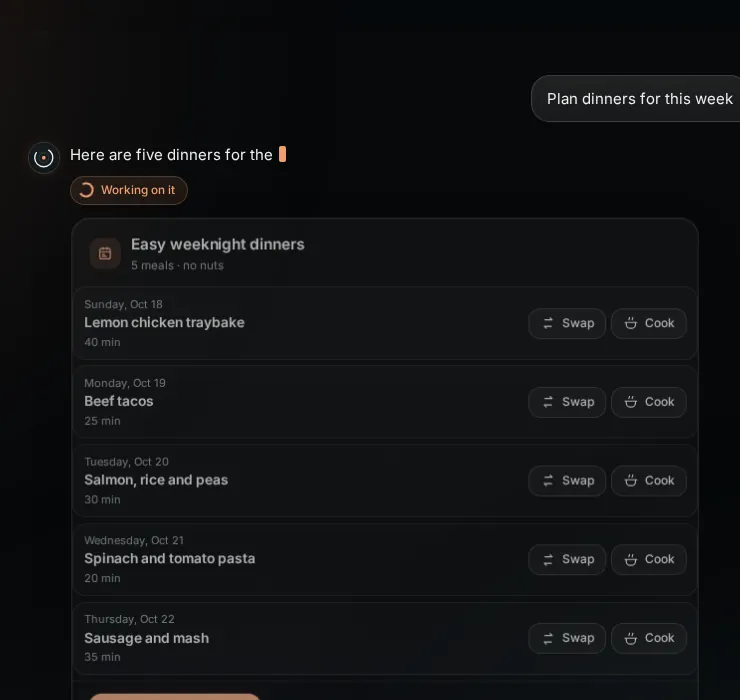
Ask "plan dinners for this week" and PelQi makes a plan from what it knows about your household: who is at home, food notes like allergies and dislikes, and what is in the fridge if you tell it or snap a photo.
Meal plans work on every plan. Free makes 1 plan a week; grown-ups only.
Make a plan
- Say "plan dinners for this week", or choose Plan this week's meals in Search. Add anything that helps: "something quick on Wednesday", "use up the spinach".
- A meal plan card shows each day's dinner with its time.
- Swap gives a different dish for that day; Cook opens cook mode, step by step.
- Choose Add to shopping list. Each ingredient goes on once, grouped by aisle, leaving out what is already on the list and what you said is in the fridge.
Allergies
Tell PelQi once, for example "Oliver is allergic to nuts". PelQi remembers it and checks every meal word by word against it, including foods that contain it. A meal that fails is replaced or left out, and the card says what was kept out.
What it can and cannot do
- Allergies are checked on the server for every meal; a meal with an allergen is never kept in a plan.
- Only food notes (allergies, dislikes, diets, budget) are used, not your other notes.
- Ingredients go on the shopping list once each, by aisle, skipping what is already there.
- Free makes 1 plan a week. Grown-ups only; children can see the plan and Cook.
What you should see
Tonight's meal also shows on Today as Meal of the day. A meal plan uses your daily allowance like a chat message.
If it does not work
- "One plan a week on Free": you can still swap meals. Paid plans make as many as the allowance allows.
- A food someone dislikes appeared: tell PelQi ("Lily doesn't eat mushrooms") and swap that day.
- Children see the plan and cook mode but cannot make plans.
Still stuck?
Email info@fortisdatagroup.com with what happened, what you expected and the device you use (for example, iPhone app, or Chrome on Windows). A person reads every message and answers within two working days. Never send a password or a code.
Common questions are also on the support page.