Home Assistant connection refused
Updated 18 October 2026
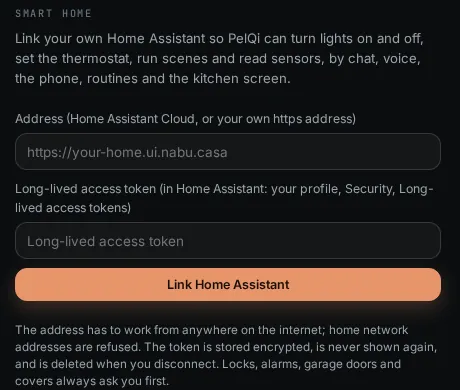
PelQi talks to your Home Assistant over the internet, from PelQi's servers, not from your home. So the address must work from anywhere on the internet, over https. A home-only address such as 192.168.1.20 or homeassistant.local is refused with a message saying why.
Messages about the address
- "PelQi only connects to Home Assistant over https. Use your Home Assistant Cloud (Nabu Casa) address or your own https address." The address starts with http://. Use https.
- "PelQi connects on the usual https ports (443, 8123 or 8443)." The address has another port number. Use one of those, or none.
- "PelQi can't use that address: it is a name that only works inside a network." Names like homeassistant.local, .lan or a single word only work at home.
- "That address is not on the public internet, so PelQi can't use it." The name points at a home or private address (such as 192.168.x.x or 10.x.x.x).
- "Leave any user name or password out of the address." Remove anything before an @ in the address.
- "PelQi couldn't find that address. Check it in your Home Assistant settings." The name does not exist. Check for a typing mistake.
- "That address doesn't have a valid https certificate." The certificate has expired or is self-signed. Fix the certificate, or use Home Assistant Cloud.
- "Your Home Assistant address redirects somewhere else." PelQi does not follow redirects. Paste the final address.
- "Your Home Assistant didn't answer in time." or "PelQi couldn't reach your Home Assistant just now." Check Home Assistant is running and reachable from outside your home, for example from your phone on mobile data.
- "That address answered, but not like Home Assistant. Check it is your Home Assistant address." The address belongs to something else.
Messages about the token
- "Home Assistant didn't accept that token. Make a new long-lived access token in your Home Assistant profile and paste it again." The token is wrong, was deleted, or was made for another Home Assistant.
- "Paste the long-lived access token from your Home Assistant profile (Profile, Security, Long-lived access tokens)." What was pasted is not a token. In Home Assistant, open your profile, then Security, create a Long-lived access token, copy all of it, and paste it into PelQi.
The address that works
The easiest is your Home Assistant Cloud (Nabu Casa) address, which looks like https://something.ui.nabu.casa. Your own https address with a valid certificate on port 443, 8123 or 8443 works too.
Later problems
- "Smart home is paused: the plan it was linked on no longer includes it. A grown-up on Plus, Family or Max can link it again." The grown-up who linked it moved to Free.
- "That's a lot of tries in an hour. Try again later." Linking is limited to 10 tries an hour for each person.
What you should see
Connections shows your Home Assistant as linked, with its location name and version, and Open smart home lists your rooms and devices.
If it still does not work
Email info@fortisdatagroup.com with the message and whether you use Home Assistant Cloud. Never send your token.
Still stuck?
Email info@fortisdatagroup.com with what happened, what you expected and the device you use (for example, iPhone app, or Chrome on Windows). A person reads every message and answers within two working days. Never send a password or a code.
Common questions are also on the support page.