Try it now: a dry run before you rely on it
Updated 18 October 2026
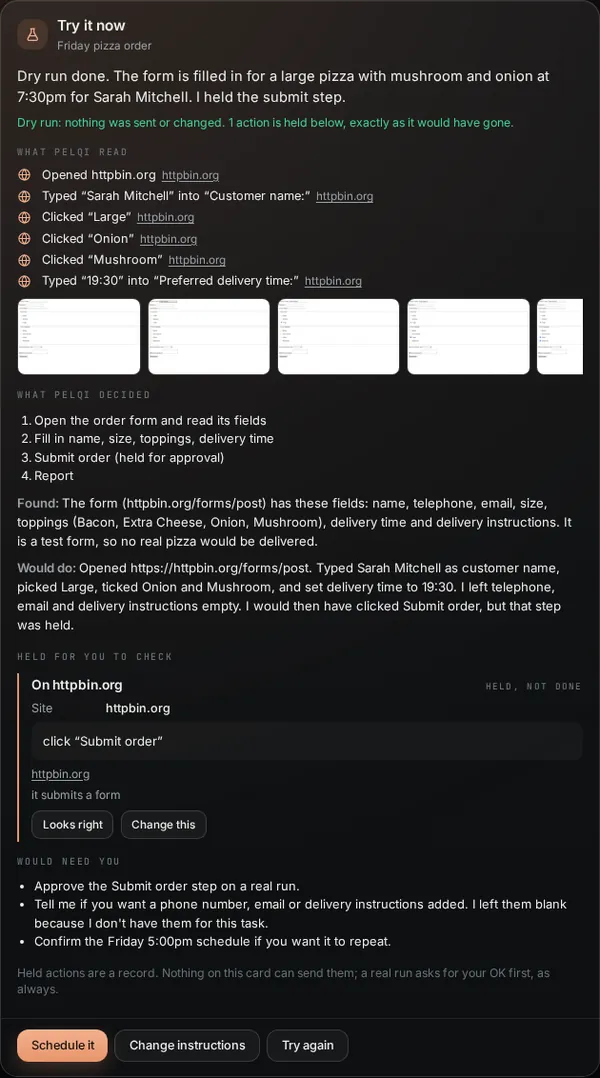
Before you trust PelQi with a repeating job, you can watch it do the job once with nothing leaving. A dry run reads, searches and drafts for real, then stops at anything that would send, book, buy or change something, and shows it to you exactly as it would have gone.
Every plan. Free has 1 dry run a day, Plus and Family 3, Max 20.
Start a dry run
- On a Schedule this? card in chat, choose Try it now. Or say "try it first" when you ask for the schedule.
- On the Scheduled page, open a task and choose Try it now, or use Try it first after Read it back on a new one.
- Background tasks have Try it now in their detail too, and agents have it on their page (see Agents).
Read the result
- While PelQi works, the card says so. You can leave; a notification ("Dry run ready") tells you when it is done.
- What PelQi read: its searches, pages and browser steps, with screenshots.
- What PelQi decided: its plan, what it found and what it would do.
- Held for you to check: every action it stopped, exactly: an email with who it is to and the words, a call, a calendar entry, list items, or a browser step with the site and button. Each has Looks right and Change this. What you write in Change this is followed from the next run.
- Would need you: anything it would ask you on a real run.
- Then choose what next: Schedule it, Run for real now, Work on it for real, Change instructions or Try again.
What it can and cannot do
- It reads for real: the web, its browser, the family calendar and lists, what it remembers.
- It never sends, books, pays, posts or changes your lists or calendar. The task's schedule, record and run count are not changed either.
- Held actions are records only: nothing on the card can send one, and they never turn into approvals.
- A real run still asks for your OK before anything outward, as always. Children have no dry runs.
Limits by plan
Dry runs a day: Free 1, Plus 3, Family 3 for each person, Max 20. They use your allowance like a real run. A dry run that cannot start or does not finish gives its count back.
If it does not work
- "The dry run did not finish. Nothing was sent or changed." Choose Try again. It did not count towards today's dry runs.
- No dry runs left today: they come back tomorrow, or you can choose Schedule it and check the first real report.
- Nothing was held: "this run only read and reported". That is normal for jobs that only look things up.
Still stuck?
Email info@fortisdatagroup.com with what happened, what you expected and the device you use (for example, iPhone app, or Chrome on Windows). A person reads every message and answers within two working days. Never send a password or a code.
Common questions are also on the support page.