Max chat controls: models, effort, permission modes, Plan first and Ask three ways
Updated 18 October 2026
PelQi Max adds controls for people who want more say over how PelQi answers. They all live in one panel, opened from the reply mode button beside the message box, and in the + menu.
These controls come with PelQi Max. Other plans see them dimmed with "With Max".
Open the controls
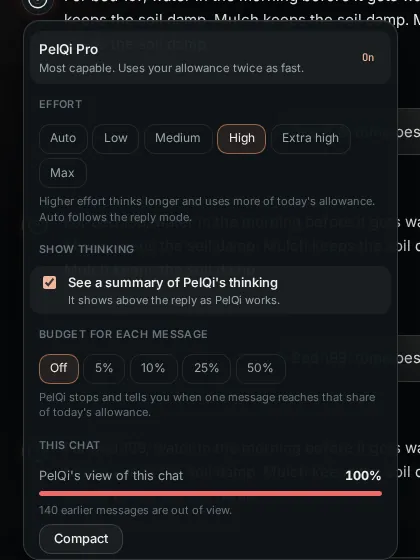
- Tap the reply mode button beside the message box. The panel shows how PelQi replies, Model, Effort, Show thinking, Budget for each message, This chat and When PelQi asks you.
What each control does
- Model: PelQi Fast is quickest and cheapest, PelQi is the everyday choice, PelQi Pro is the most capable and uses your allowance twice as fast.
- Effort: Auto, or Low to Max. Higher effort thinks longer and uses more of today's allowance.
- Show thinking: a summary of PelQi's thinking appears above the reply while it works. On easy questions there may be none.
- Budget for each message: Off, 5, 10, 25 or 50 percent of today's allowance. PelQi stops when a message reaches it and says so; say "carry on" to keep going.
- This chat: how full PelQi's view of a long chat is. Compact writes a summary so PelQi keeps track of everything said so far.
- When PelQi asks you: Ask only for outward actions (how PelQi always works), Ask every time (every change waits for your tap, even adding to a list), or Auto within my rules (things you tick may go ahead alone). Calls, texts, payments, sign-ins and anything after PelQi reads outside content always ask.
Plan first, Ask three ways and more
- Plan first: PelQi proposes the steps before doing anything. Approve, Edit steps, Try it first or Not now. Only approved steps can change anything.
- Ask three ways: for your next message only, get three answers side by side, from three models or three approaches. Keep this one carries the chat on from the one you like. It counts as three messages.
- In the + menu: Send to background turns your message into a background task, and Send on a schedule sends it at the times you say. Under a reply, Branch this chat copies the chat up to there into a new one.
What it can and cannot do
- Every control is checked on the server: on other plans they are refused before PelQi answers.
- PelQi Pro uses today's allowance twice as fast; PelQi Fast uses far less.
- Ask every time holds even small changes, such as adding to a list, until you allow them.
- Auto within my rules never covers calls, texts, payments, sign-ins or anything after PelQi has read outside content.
- Children always have the default controls.
If it does not work
- A control is dimmed with "With Max": it is part of PelQi Max. See Plans compared.
- A reply stopped early: the budget for each message was reached. Say "carry on", or raise the budget.
Still stuck?
Email info@fortisdatagroup.com with what happened, what you expected and the device you use (for example, iPhone app, or Chrome on Windows). A person reads every message and answers within two working days. Never send a password or a code.
Common questions are also on the support page.