What PelQi can and cannot do in your home
Updated 18 October 2026
Once Home Assistant is linked, PelQi can do everyday things straight away and asks first about anything that keeps your home safe. Plain requests like "turn off the kitchen lights" are carried out without the AI, so they do not use your allowance.
Smart home comes with PelQi Plus, Family and Max.
Straight away
- Lights: on, off and brightness. "Dim the lamp to 30%." "Turn off all the lights."
- Switches, fans and on-off helpers.
- Speakers: on, off, play, pause and volume.
- Thermostats: the temperature, within the device's own limits, and the mode. "Set the thermostat to 70."
- Home Assistant scenes and scripts. "Run movie night."
- Reading sensors. "Is the back door shut?"
Always asks first
- Locks, alarm panels, garage doors, gates, blinds and other covers, valves and sirens.
- Any switch, scene or script whose name talks about a door, garage, gate, lock, alarm or security, and any scene or script that touches one of those.
- Every script, if your token cannot show PelQi what scripts touch (a non-administrator token).
When you ask for one of these, a card appears in the chat and in Approvals, and nothing changes until a grown-up taps it. The card lapses after 15 minutes. A spoken yes on a phone call does not count: it waits in the app.
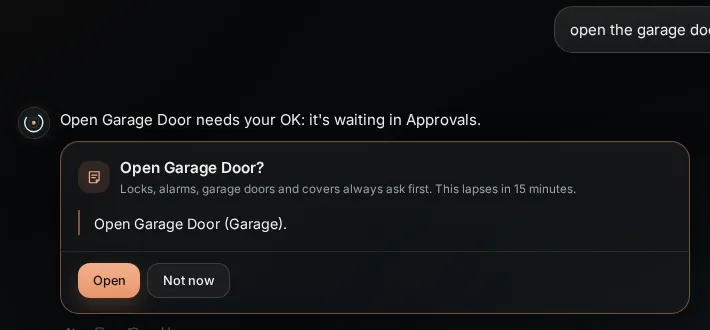
What it can and cannot do
- Plain requests that name one device or one room clearly are carried out without the AI and use none of your allowance.
- Guarded devices are never changed automatically, by any setting, routine or phone call.
- Vacuums, cameras and some other device types are not offered yet.
- PelQi reads your devices from Home Assistant as you use them (at most 20 seconds old) rather than keeping its own list.
- It makes at most 30 changes a minute, and 240 an hour, for a household.
What you should see
For straight-away requests, PelQi confirms in a sentence ("Done, the hallway thermostat is set to 71."). For guarded devices, the card with the device and the action.
If it does not work
- "Which one?" You have several devices with that name; say the room too, like "the kitchen lights".
- "PelQi couldn't reach your Home Assistant just now." Check Home Assistant is running and reachable from outside your home.
- "That was asked more than 15 minutes ago, so PelQi didn't do it." Ask again.
Still stuck?
Email info@fortisdatagroup.com with what happened, what you expected and the device you use (for example, iPhone app, or Chrome on Windows). A person reads every message and answers within two working days. Never send a password or a code.
Common questions are also on the support page.