"Today's allowance is used up"
Updated 18 October 2026
Every plan has a daily allowance for chat. When it runs out, PelQi shows a card titled Today's allowance is used up (or Today's free allowance is used up on Free) and says "That's today's allowance used up. It resets at midnight."
Why it happened
- On Free, the allowance is shared. Everyone at home on Free, grown-ups and children, uses one daily allowance, about 25 everyday messages between you. PelQi says "That's today's free allowance used up, shared by everyone at home on Free."
- Some things use more. Web searches, reading pages, Research, PelQi's browser, photos and long documents use more of the allowance than a quick question. Thorough replies use a little more than Quick ones.
- Background work counts too. Tasks, scheduled runs and Try it now use the same daily allowance.
Check how much is left
- Look at the ring in the message box, or the ring around your initial at the bottom left. It turns amber from 80% and red when it is used up.
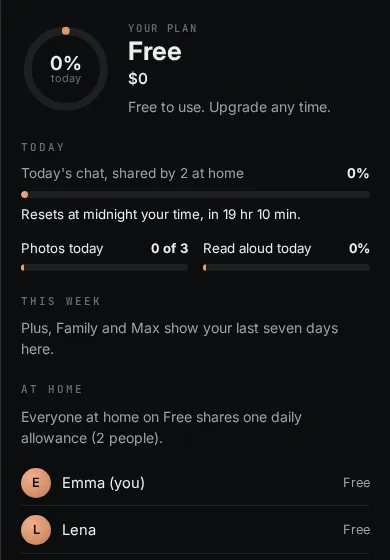
- Tap the ring for the usage card: today's chat, when it resets, photos and read aloud today.
- For the full picture open Plan and usage from the account menu.
What still works
Timers and alarms, plain reminders, announcements, smart home commands in plain words, and routines without an "Ask PelQi something" step never use the allowance, so they keep working. Your lists, calendar and Today board are always there.
When it comes back
At midnight where you are. The usage card shows the time left.
If you need more
Plus gives one person about four times Free's allowance, and Family gives each person at home that much. See Free, Plus, Family and Max compared and Upgrade your plan. In the PelQi iPhone app there is no Upgrade button; upgrade on the web.
If it still does not work
If the allowance shows as used up but you have hardly used PelQi, email info@fortisdatagroup.com with your plan and roughly when it happened.
Still stuck?
Email info@fortisdatagroup.com with what happened, what you expected and the device you use (for example, iPhone app, or Chrome on Windows). A person reads every message and answers within two working days. Never send a password or a code.
Common questions are also on the support page.