Connect Google Calendar (invite-only for now)
Updated 18 October 2026
Connect your own Google account and choose which of your Google calendars PelQi reads. Those events show in your morning brief, on Today, in routines and to your agents, merged with the family calendar so each event shows once, and PelQi points out clashes. PelQi only reads: it cannot add, change or delete events, and it never reads Gmail.
Google Calendar connects on PelQi Plus, Family and Max, for grown-ups, and is invite-only during Google's review.
Invite-only while Google reviews PelQi
Google is still checking PelQi's calendar connection. Until Google finishes, only accounts PelQi has invited can connect; anyone else sees Google stop the sign-in on its own page. Invited accounts are asked to connect again every seven days while this lasts. If you would like to try it, email info@fortisdatagroup.com with the Google address you use; we can add a small number of testers, but we cannot promise a place.
Connect it
- Open your account at the bottom of the menu and choose Connections.
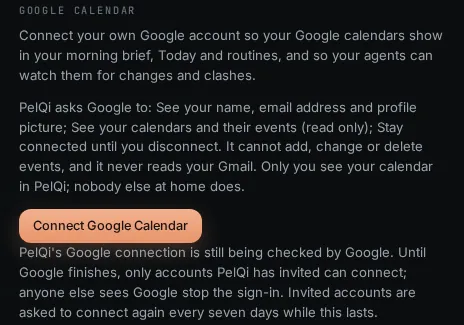
- Under Google Calendar, read what PelQi asks Google for: your name, email address and profile picture, your calendars and their events (read only), and to stay connected until you disconnect.
- Choose Connect Google Calendar. Google's own sign-in page opens.
- Pick your Google account.
- On Google's permissions screen, leave the calendar box ticked. See Leave the calendar box ticked.
- Choose Continue.
Choose your calendars
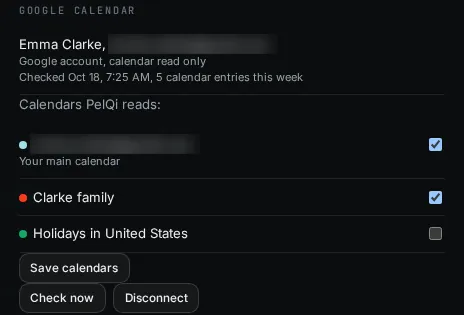
- Back in Connections, under Calendars PelQi reads, tick the calendars you want. Your main calendar is ticked the first time.
- Choose Save calendars. PelQi reads up to 10 calendars.
What it can and cannot do
- It reads up to 10 calendars you choose, the next eight days, refreshed every 15 minutes.
- It merges them with the family calendar and a connected Microsoft calendar, so each event shows once, and points out up to three clashes in your brief and on Today.
- It cannot add, change or delete events, and it never reads Gmail.
- Only you see your Google events. Children never have it.
What you should see
"Google account connected. Your calendar shows in a moment." PelQi copies the next eight days of the chosen calendars and refreshes them every 15 minutes; Check now refreshes straight away. If an event is in two places (for example your Google calendar and the family calendar), it shows once. When two timed events overlap, your brief and Today add a line like "Clash: Physio appointment at 3pm and Swimming lesson at 3:30pm." Only you see your Google events.
If it does not work
- Google says access is blocked, or "Google sign-in was cancelled": your account is not on the invited list yet. See the invite section above.
- "PelQi needs to see your calendar": see "PelQi needs to see your calendar".
- "Google asked to sign in again" under your account: choose Reconnect. While PelQi is in Google's review, Google ends the connection every seven days, so this is expected weekly.
- "Paused: your plan no longer includes connections." Your plan changed to Free. Nothing is read until you are on a paid plan again.
Still stuck?
Email info@fortisdatagroup.com with what happened, what you expected and the device you use (for example, iPhone app, or Chrome on Windows). A person reads every message and answers within two working days. Never send a password or a code.
Common questions are also on the support page.