Agents (PelQi Max)
Updated 18 October 2026
An agent keeps an eye on something so you do not have to: "tell me when these trainers drop under $80", "watch my inbox for anything from the school", "every evening, check tomorrow's calendar and flag clashes". Checking costs nothing; only a change uses your allowance.
Agents come with PelQi Max.
Make an agent
- Open Agents in the sidebar (on a phone, More, then Agents) and choose New agent.
- Say what it should watch and what it should do, in your own words, and choose Set it up. Or fill in the form yourself.
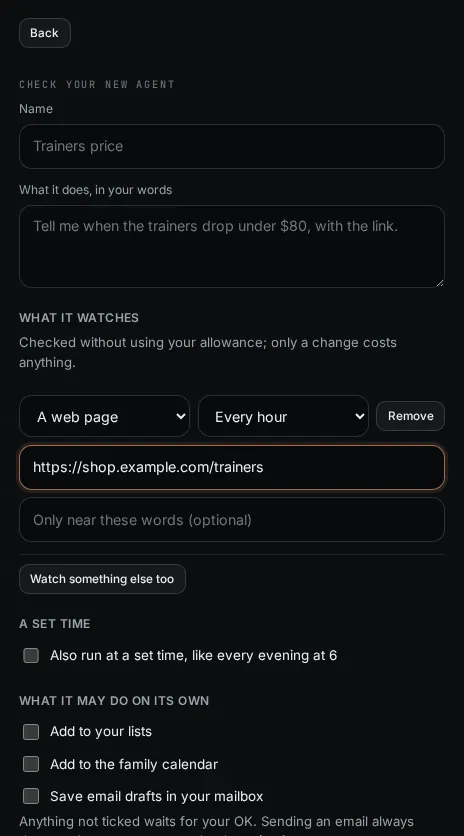
- Check your new agent: its name, What it does, in your words, and What it watches: A web page, A price, The family calendar or Your inbox (up to four), and how often (from every 15 minutes to once a day).
- Under What it may do on its own, tick only what it may do without asking: add to your lists, add to the family calendar, save email drafts. Anything not ticked waits for your OK. Sending an email always asks.
- Add rules in your words (may, ask first, never), quiet hours, and its share of your weekly agent allowance.
- Choose Save as a draft. Use Try it now to see what it would do today with nothing leaving, then Switch it on.
What it can and cannot do
- It can tell you what it found (with the link), keep notes between checks, add to lists or the calendar if you ticked that, and draft a reply that waits for Send.
- It cannot pay, buy, book, sign in, change an account, change its own rules or contact anyone new.
- During quiet hours it keeps going and tells you when they end.
Limits
Up to 10 agents on Max, checking no more often than every 15 minutes. Every check is free; when something changes, a quick look decides whether it matters, and only then does the agent run. Runs use the weekly agent allowance, which resets on Monday where you are. Children never have agents.
What you should see
A notification when an agent tells you something, and its page showing what it checked, noticed, let go and did. Watching your inbox needs your Microsoft account connected.
If it does not work
- The agent says Paused: see My agent is paused.
- It missed a change: agents check on a schedule and can miss a change that comes and goes between checks. Shorten how often it checks.
- "Part of PelQi Max": agents come with Max. See Upgrade your plan.
Still stuck?
Email info@fortisdatagroup.com with what happened, what you expected and the device you use (for example, iPhone app, or Chrome on Windows). A person reads every message and answers within two working days. Never send a password or a code.
Common questions are also on the support page.