Your first chat with PelQi
Updated 18 October 2026
Once you are in, PelQi opens a chat. Before its first answer it shows how it uses AI and asks you to agree. After that, type or talk to it the way you would to a helpful person at home.
Agree to how PelQi uses AI
PelQi answers with Claude, an AI model made by Anthropic. The first time you send a message, PelQi shows How PelQi uses AI: what is sent to Anthropic to answer you, that Anthropic does not use it to train its models, and that your voice is turned into text on PelQi's own servers. Read it and choose I agree. You can read it again or withdraw any time from Help, then How PelQi uses AI.
Start talking
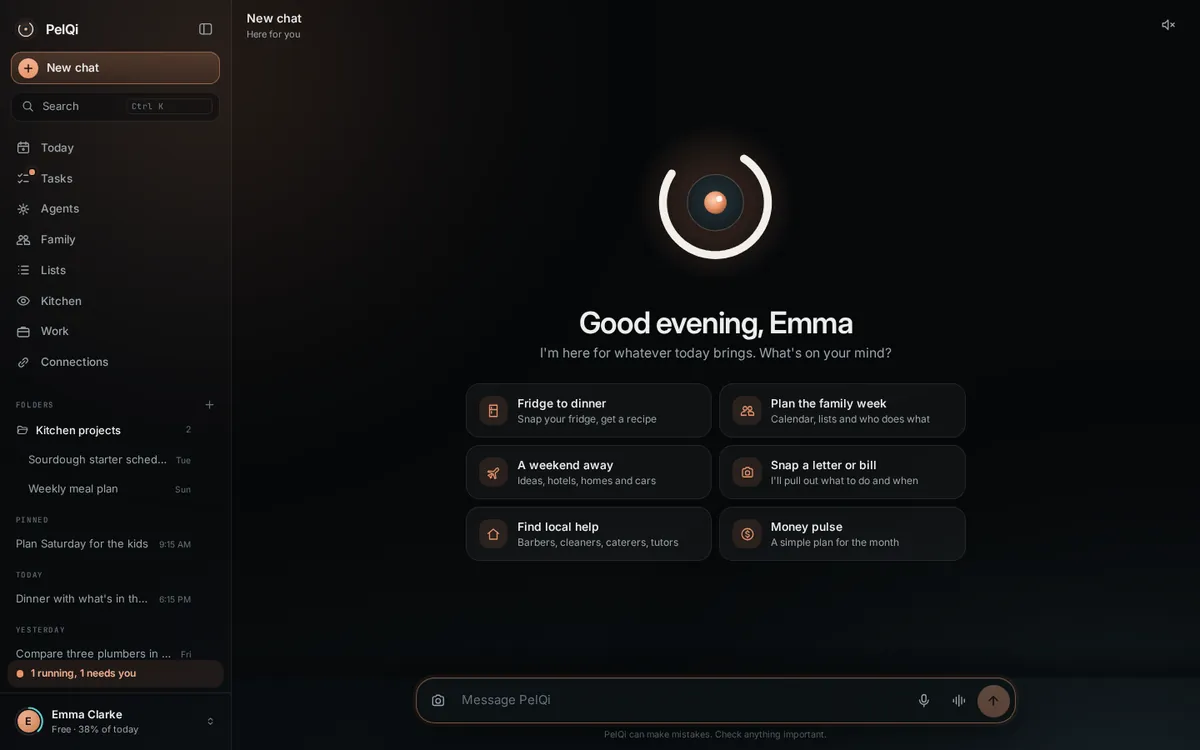
- Type in the Message PelQi box at the bottom and press Enter, or tap the send arrow.
- Or tap one of the suggestions on an empty chat, such as Fridge to dinner (snap your fridge, get a recipe) or Plan the family week.
- To talk instead of typing, tap the microphone to dictate or the waveform to start a live voice conversation. See Talk or type.
- Tap a quick reply under PelQi's answer to keep going with one tap.
Things to try first
- "I've got salmon, rice and half a lemon. What can I make?" PelQi sends a recipe card with cook mode and an add to shopping list button.
- "Add milk and eggs to the shopping list." It goes on the list everyone at home shares.
- "My passport runs out in May." PelQi keeps track of it and reminds you when it is time.
- "Set a 10 minute timer." Timers are free on every plan.
- Snap a letter or bill with the + button. PelQi pulls out what needs doing and any dates.
What you should see
PelQi's eye changes with its mood while it answers, and the reply streams in. Your chat gets a title from what you first asked and appears under Recents in the sidebar (or under More on a phone), so you can come back to it. Start a fresh one any time with New chat.
If it does not work
- PelQi does not answer: check you chose I agree on How PelQi uses AI. Until you do, PelQi cannot answer.
- "You've used today's allowance": see Daily allowance used up.
- The microphone does nothing: see PelQi cannot hear me.
PelQi can make mistakes. Check anything important, especially health, legal, money or safety matters.
Still stuck?
Email info@fortisdatagroup.com with what happened, what you expected and the device you use (for example, iPhone app, or Chrome on Windows). A person reads every message and answers within two working days. Never send a password or a code.
Common questions are also on the support page.