Create your PelQi account
Updated 18 October 2026
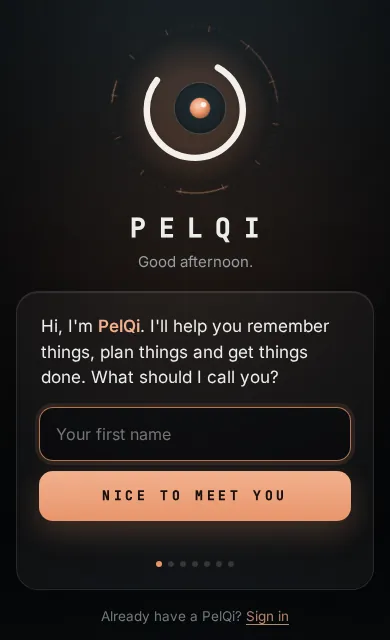
Anyone can make their own PelQi for free. Sign-up is a short first conversation with PelQi: it asks your name, an email and password, checks your email with a code, then lets you choose how it sounds.
What you need
- An email address you will keep. Throwaway email addresses are refused.
- A password you have not used anywhere else.
- A web browser, or the PelQi app on iPhone if you are a tester. PelQi works in Chrome, Edge, Safari and Firefox.
Make your PelQi
- Go to pelqi.com and choose Start free, or open app.pelqi.com/join directly. If someone at home invited you, use the link they sent instead, so you join their home at the end.
- Type the first name you want PelQi to call you and choose Nice to meet you.
- Enter your email and a password. Tick the security check box when it appears (it says Success! once it is happy), then choose Make my PelQi.
- PelQi emails you a six-digit code. Type it in and choose Check my code. See Confirm your email with the code if it does not arrive.
- Tap each voice to hear it, then choose This one. Pick a personality (Warm, Playful, Straight-talking or Calm) and choose Sounds like me. You can change both later in Settings.
- Pick what you would like help with, as many as you like, and choose Meet my PelQi.
What you should see
PelQi says hello in the voice you chose and opens your chat. You start on the Free plan, with no card needed. Your own home is made for you at the same time, so you can add family later.
If it does not work
- "PelQi needs an email you'll keep." The address is from a throwaway email service. Use your everyday email.
- "Tick the box that says you're a person" or no box appears: see The security check box is missing.
- No code arrives: see No code email.
- You already have an account with that email: choose Sign in under the card instead, and use Forgot password? if you need to.
Still stuck?
Email info@fortisdatagroup.com with what happened, what you expected and the device you use (for example, iPhone app, or Chrome on Windows). A person reads every message and answers within two working days. Never send a password or a code.
Common questions are also on the support page.