Children's profiles
Updated 18 October 2026
Children get their own PelQi, made by a grown-up, with no email or password. It is a patient tutor: it guides homework instead of giving the answers, runs quizzes and flashcards and hands out stars for effort.
Add a child
- Open Family.
- Under Grown-up PIN, set a PIN of 4 to 6 numbers and choose Save. Do this first: the PIN is what stops a child switching back to your PelQi.
- Under Add a child, type their name and age (3 to 17) and choose Add.
Hand the device to your child
- In Family, choose Use their PelQi next to the child.
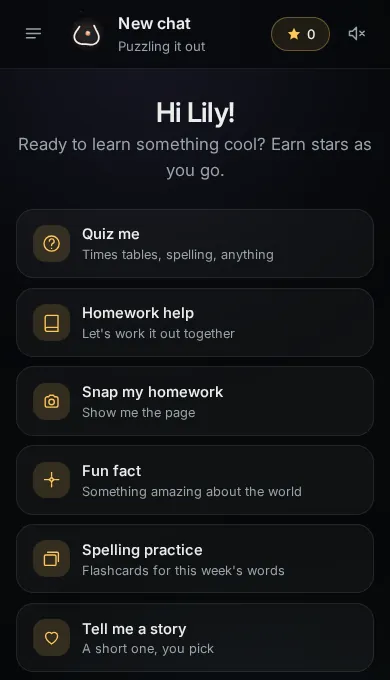
- PelQi opens as the child's own PelQi, with their name and their own chats.
- To come back, open the menu and choose Back to the grown-up's PelQi, then type the grown-up PIN.
What children can and cannot do
- They can chat, use voice, ask for homework help, add to the family's lists, see the family calendar, use timers and run the household's routines.
- They cannot invite people, manage the family, add calendar events, delete accounts, connect accounts, start background tasks or use agents. PelQi does not read web pages for children.
- PelQi logs their learning where grown-ups can see it, and gives at most 20 stars a day.
- How many children a home can have depends on the plan: 1 on Free and Plus, up to 4 on Family and Max.
- More in How children are protected.
What you should see
The child appears in Family with their age and stars. Their PelQi greets them by name with child-friendly suggestions.
If it does not work
- Switching back did not ask for a PIN: no PIN is set yet. Set one under Grown-up PIN.
- "That PIN is not right": try again. After several wrong tries PelQi asks you to wait a few minutes.
- You cannot add another child: your plan's limit is reached. See Who a plan covers at home.
Still stuck?
Email info@fortisdatagroup.com with what happened, what you expected and the device you use (for example, iPhone app, or Chrome on Windows). A person reads every message and answers within two working days. Never send a password or a code.
Common questions are also on the support page.