Chores and rewards for children
Updated 18 October 2026
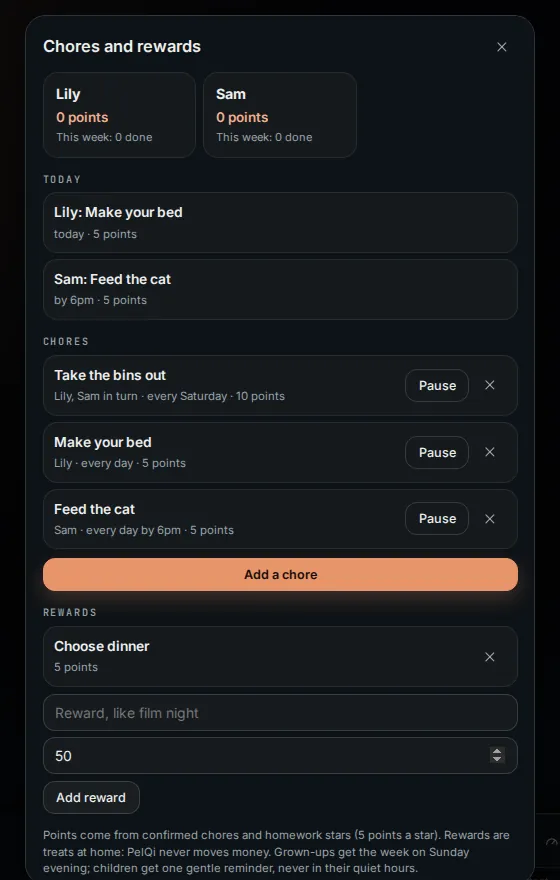
Grown-ups give children chores. Children tick them off on their PelQi, a grown-up confirms, and points add up towards rewards you choose, like film night. Rewards are treats at home: no money moves anywhere.
Chores come with Plus (one child), Family and Max (up to four children).
Set up chores
- Open Family and choose Chores and rewards (or search for it).
- Choose Add a chore. Give it a name, the child or children, the points, how often (just once, every day, weekdays, or once a week), and an optional time to be done by.
- With several children, choose whether each child does it or One child each time, taking turns.
- Under Rewards, add a reward with Add reward and the points it costs.
Day to day
- Children tick their chores on their PelQi, on Today, or by telling PelQi "I made my bed". Anyone can tick a child's chore on the kitchen screen with Chores.
- A grown-up chooses Confirm (on Today, in Chores, or in Approvals), or Not yet with an optional note.
- When a child has enough points they choose Ask for it on a reward. A grown-up chooses Give it or Not now, and the points come back if not.
What it can and cannot do
- Points count only when a grown-up confirms a tick.
- Rewards are treats at home. No money moves, and money rewards are refused.
- Children cannot make, change or confirm chores, or make rewards.
- Reminders are never sent in a child's quiet hours.
- Free has no chores; Plus covers one child, Family and Max up to four.
What you should see
Points are confirmed chores plus homework stars (5 points a star) minus rewards. Each Sunday evening grown-ups get a summary of every child's week. Children get one gentle reminder per chore, never in their quiet hours.
If it does not work
- "Add a child in Family first": chores need a child's profile. See Children's profiles.
- "Beyond your plan's children": Plus covers chores for one child; Family and Max up to four.
- A reward is refused: rewards that talk about money or pay are not allowed.
Still stuck?
Email info@fortisdatagroup.com with what happened, what you expected and the device you use (for example, iPhone app, or Chrome on Windows). A person reads every message and answers within two working days. Never send a password or a code.
Common questions are also on the support page.