Call PelQi on its phone number
Updated 18 October 2026
PelQi has its own phone number. Save your mobile and a phone PIN, then call PelQi from that phone and talk to your own PelQi, with your lists, calendar and memory, from anywhere.
Calling PelQi comes with Plus, Family and Max, for grown-ups. On PelQi Work, the same call reaches your workspace.
Set it up
- Open Settings from your account, go to You, and find Phone (also in your account menu as Phone).
- Type your mobile number in Your mobile and choose a Phone PIN of 4 to 6 digits. Easy PINs like 1234 are refused.
- Choose Save.
Call PelQi
- From that mobile, call (910) 348-7364.
- PelQi greets you by name and asks for your phone PIN. Say it. Caller ID can be faked, so PelQi shares nothing personal before the PIN.
- Talk as you would in the app: add to a list, check the calendar, set a reminder, ask about the weather.
- If PelQi prepares a call to a business on your call, it reads it back and places it only after a clear yes. Anything else, like a payment, waits in the app for a tap.
On PelQi Work
If you are in a PelQi Work workspace, the same call reaches it. Ask about the business and PelQi answers from the workspace: what needs you, a client's latest email, what is due this week.
- Ask PelQi to draft an email or another request and it goes to the workspace's Approvals as usual. PelQi reads it back, and sends it only after a clear yes on the call.
- Pick something already waiting in Approvals, by saying what it is, and decide it with a clear yes on the call.
- Your workspace role still decides what you can approve, and only the owner of a mailbox can send from it.
When someone else calls the number
- A business PelQi called for you calls back: PelQi knows what the call was about, takes the message and shares nothing new. The message lands in your app with a notification.
- Anyone else: PelQi says it is an AI assistant line and takes a message. It never says who uses PelQi.
What it can and cannot do
- After your PIN, PelQi on the phone has your own PelQi: lists, calendar, reminders and memory.
- Caller ID alone is never enough: nothing personal is shared and nothing is done until you say your PIN.
- It places a call it prepared on that call only after a clear yes. On PelQi Work, an email or request in Approvals is decided the same way. Everything else, like a payment, waits in the app for a tap.
- A call uses your daily allowance like a chat.
- Texting PelQi's number is not available yet.
- Calls out go to US and Canada numbers only, 8am to 9pm where you are, up to 5 a day, never emergency numbers.
What you should see
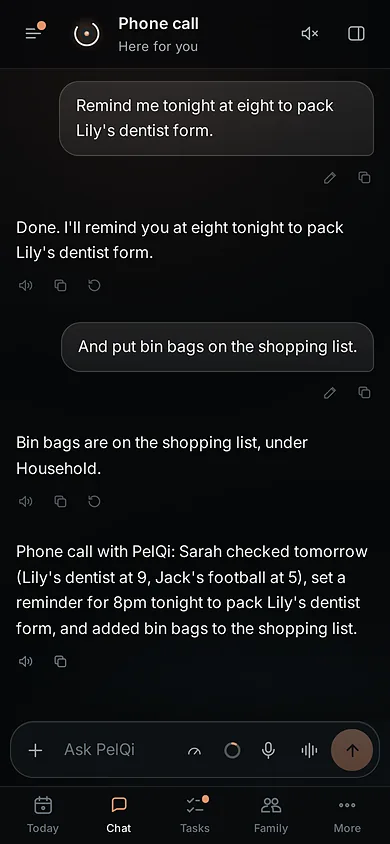
The call appears in your app as a "Phone call" chat, with a summary when you hang up. Your PIN is hidden in everything PelQi keeps.
PelQi calling a business for you
- In chat, ask PelQi to call a business, for example to check opening times. A card shows who, the number and what PelQi will ask. Nothing is dialled until you tap Call.
- PelQi says at the start that it is an AI assistant calling for you, never pays or shares more than you approved, and posts a summary in your chat afterwards.
- Calls go to US and Canada numbers only, between 8am and 9pm where you are, never to emergency numbers. Up to 5 calls a day.
If it does not work
- PelQi does not recognise you: call from the exact mobile you saved, with caller ID on.
- "Talking to PelQi by phone is part of Plus and Family": your plan does not include the phone line. See Plans compared.
- Texting PelQi: not available yet. Texts to the number are not answered.
- Locked out after wrong PINs: three tries a call and six a day. Try again tomorrow, or set a new PIN in Settings.
Still stuck?
Email info@fortisdatagroup.com with what happened, what you expected and the device you use (for example, iPhone app, or Chrome on Windows). A person reads every message and answers within two working days. Never send a password or a code.
Common questions are also on the support page.